Learning goals
By the end, you can…
Specify
Turn a user need into exact behaviour.
Decompose
Split one product into testable functions and layers.
Integrate
Combine known-working sensor, sound, and RGB parts.
Test
Use normal, boundary, invalid, and shutdown cases.
Control scope
Finish one reliable improvement.
Explain
Demonstrate evidence and describe one fixed bug.
Today’s route
Plan → build layers → integrate → prove
behaviour
hardware layer
function at a time
test cases
Do not wire everything and start the final endless loop as one first test.
The user problem
Give clear feedback as an object approaches
On paper · Describe what a user should notice
Input
Distance measurement—or no usable echo.
Outputs
Eight RGB pixels, short buzzer sounds, and Shell evidence.
The prototype gives classroom feedback. It does not make a real parking decision safe.
Baseline requirements
Every input belongs to one state
On paper · Check every boundary
| State | Rule | RGB | Sound |
|---|---|---|---|
| safe | over 60 cm | green | silent |
| caution | over 25 through 60 cm | amber | slow beep |
| stop | 25 cm or less | red | rapid beep |
| invalid | None | blue | silent |
From requirement to test
Use an exact setup and expected result
On paper · Complete the missing expected result
| Setup | Expected state | Expected outputs |
|---|---|---|
| flat target at 100 cm | safe | green, silent |
| flat target at 40 cm | caution | amber, slow beep |
| flat target at 15 cm | stop | red, rapid beep |
| sensor pointed away | ? | ? |
A test passes only when the observed result matches the written expectation.
Build while unplugged · Final circuit
Complete parking assistant
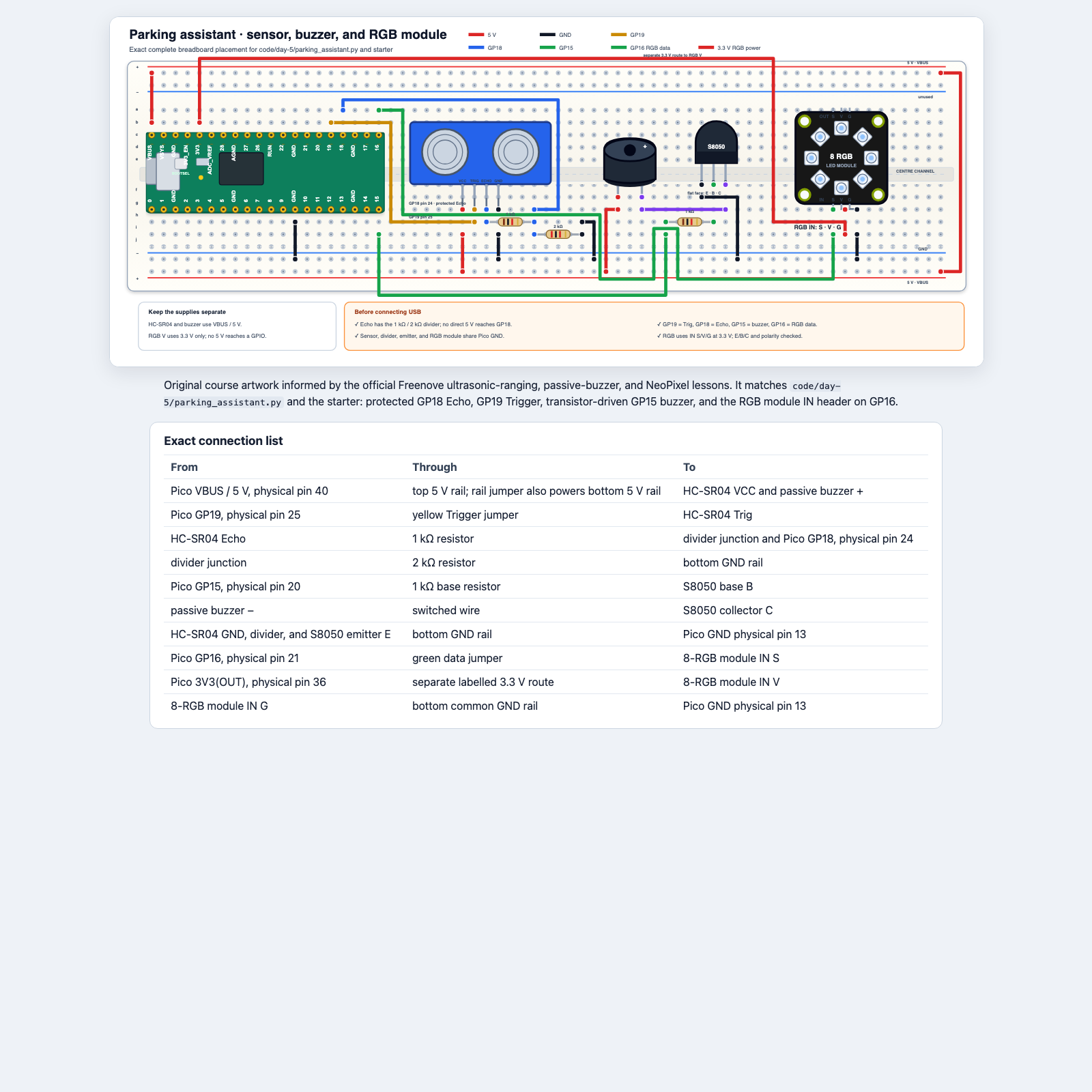
Two voltages, one common ground
Power each part from the correct source
Watch and discuss · Point to each route on the diagram
5 V / VBUS
HC-SR04 VCC and passive buzzer power.
3.3 V
RGB module power and Pico GPIO logic.
GND
Every subsystem shares the same reference.
HC-SR04 Echo still passes through the 1 kΩ/2 kΩ divider before GP18.
Layer 1 · Sensor
Build, inspect, and rerun the known test
Build while unplugged · Instructor checks before USB
- Build the HC-SR04 and both Echo-divider resistors in the final positions.
- Check VBUS, GND, GP19 Trigger, and protected GP18 Echo.
- Reconnect and run
01_distance_sensor.py. - Confirm a flat target produces believable distances and no echo produces
None.
Layer 2 · Sound
Add the buzzer without disturbing the sensor
Build while unplugged · Check transistor E/B/C
- Stop the sensor test and unplug USB.
- Add the passive buzzer, S8050, and GP15 base resistor.
- Reconnect and run
02_buzzer_test.py. - Rerun the distance test to prove the sensor still works.
Layer 3 · Colour
Add the RGB module on 3.3 V
Build while unplugged · Use the header marked IN
- Stop, unplug, then connect RGB
IN Sto GP16. - Connect
IN Vto 3.3 V andIN Gto common GND. - Reconnect and run
01_neopixel_colours.py. - Rerun sensor and buzzer tests once more.
Final unplugged check
Read the table aloud
Partner + instructor check · USB remains disconnected
Partner traces
Every signal, voltage, ground, divider resistor, transistor lead, and RGB IN pin.
Instructor confirms
No 5 V reaches GPIO, both grounds are common, and every protection part is present.
Only after this check may the final program be connected to live hardware.
The data pipeline
One value changes meaning step by step
Watch and discuss · Follow one 40 cm reading
distance = measure_distance_cm()
zone = classify_distance(distance)
show_zone(zone, distance)
sound_zone(zone)
At 40 cm: measurement → "caution" → amber pixels → slow beep.
Decomposition
Break a large task into testable pieces
On paper · Match each function to one promise
| Function | Promise | First test |
|---|---|---|
measure_distance_cm() | number or None | flat target, then no echo |
classify_distance(distance) | one state string | fixed numbers, no sensor |
show_zone(zone, distance) | matching RGB output | each state string |
sound_zone(zone) | matching sound pattern | each state string |
Test logic without the sensor
Use fixed values first
Try in Thonny · Run before the endless loop
print(classify_distance(100))   # safe
print(classify_distance(40))    # caution
print(classify_distance(15))    # stop
print(classify_distance(None))  # invalid
If this test fails, the problem is classification logic—not sensor wiring.
Configuration lookup
The state selects its colour
Watch and discuss · Predict the tuple
ZONE_COLOURS = {
    "safe": (0, 20, 0),
    "caution": (25, 8, 0),
    "stop": (25, 0, 0),
    "invalid": (0, 0, 20),
}

colour = ZONE_COLOURS["caution"]
The result is (25, 8, 0): low red plus some green produces amber.
The endless loop comes last
Integrate only tested functions
Watch and discuss · Name the four repeated steps
while True:
    distance = measure_distance_cm()
    zone = classify_distance(distance)
    show_zone(zone, distance)
    sound_zone(zone)
Stop with Ctrl+C. The supplied finally block turns RGB and PWM outputs off.
Starter file
Know what is supplied and what is yours
Try in Thonny · Open parking_assistant_starter.py
Already supplied
- imports and pin setup;
- threshold constants;
- zone colours;
- function names;
- cleanup.
You complete
- distance measurement;
- classification;
- RGB display;
- sound behaviour;
- tests and one improvement.
Implementation order
Finish, test, then move down the list
- Complete
classify_distance(); test fixed values. - Complete
show_zone(); call it with each state. - Complete
sound_zone(); keep safe and invalid silent. - Complete
measure_distance_cm(); test target and no echo. - Run the loop with sound muted; then add short buzzer feedback.
- Run every written test and record the actual result.
Test evidence
Normal, boundary, invalid, shutdown
Test the product · Record actual results
| Test | Input/setup | Expected |
|---|---|---|
| T1 | 100 cm | safe, green, silent |
| T2 | 40 cm | caution, amber, slow beep |
| T3 | 15 cm | stop, red, rapid beep |
| T4 | no useful echo | invalid, blue, silent |
| T5–6 | exactly 60 cm and 25 cm | agreed boundary states |
| T7 | press Stop | all outputs off |
Scope
One reliable improvement
On paper · Choose only after the baseline passes
Distance bar
Fill more pixels as the object approaches.
Mute mode
Keep visual warnings while silencing sound.
Self-test
Show each colour and play one quiet tone at startup.
If time becomes short, cut the improvement—not required tests or safe cleanup.
Final demonstration
Three minutes of evidence
- State the user problem and prototype limitation.
- Demonstrate safe, caution, stop, and invalid.
- Show one exact boundary test.
- Explain one function's input and return value.
- Describe one bug, the evidence, and the fix.
- Name one improvement you completed or deliberately cut.
Reflection
What did your evidence show?
Understanding
Which programming idea became clearer because you could see or hear it?
Debugging
Which bug was code, which was wiring, and which was an incorrect assumption?
Design
Where does the program store thresholds, colours, and states?
Responsibility
What would a real safety product require that this prototype does not have?
Teacher reference
Teaching sequence and sources
TEALS Unit 8 adaptation
Requirements, feasibility, decomposition, implementation tasks, checkpoints, scope control, and reflection.
Workshop adaptation
Fixed parking-assistant product, layered circuit integration, boundary/invalid/shutdown tests, and a short evidence-based demonstration.
Sources: TEALS Unit 8 lesson files, final-project plan organizer, development plan, and rubric. Hardware tasks use the workshop's original course diagrams.