Learning goals
By the end, you can…
Measure
Explain how pulse time becomes distance.
Handle failure
Use None when no useful echo returns.
Configure
Read settings from a dictionary.
Build safely
Protect GP18 and drive the buzzer through a transistor.
Specify
Write exact distance rules and expected outputs.
Test
Collect evidence before combining circuits.
Today’s route
Sense → check → decide → alert
sensor safely
distance
buzzer
and classify
Each circuit must work alone before it joins the proximity alarm.
Build while unplugged · Task 1
HC-SR04 distance sensor
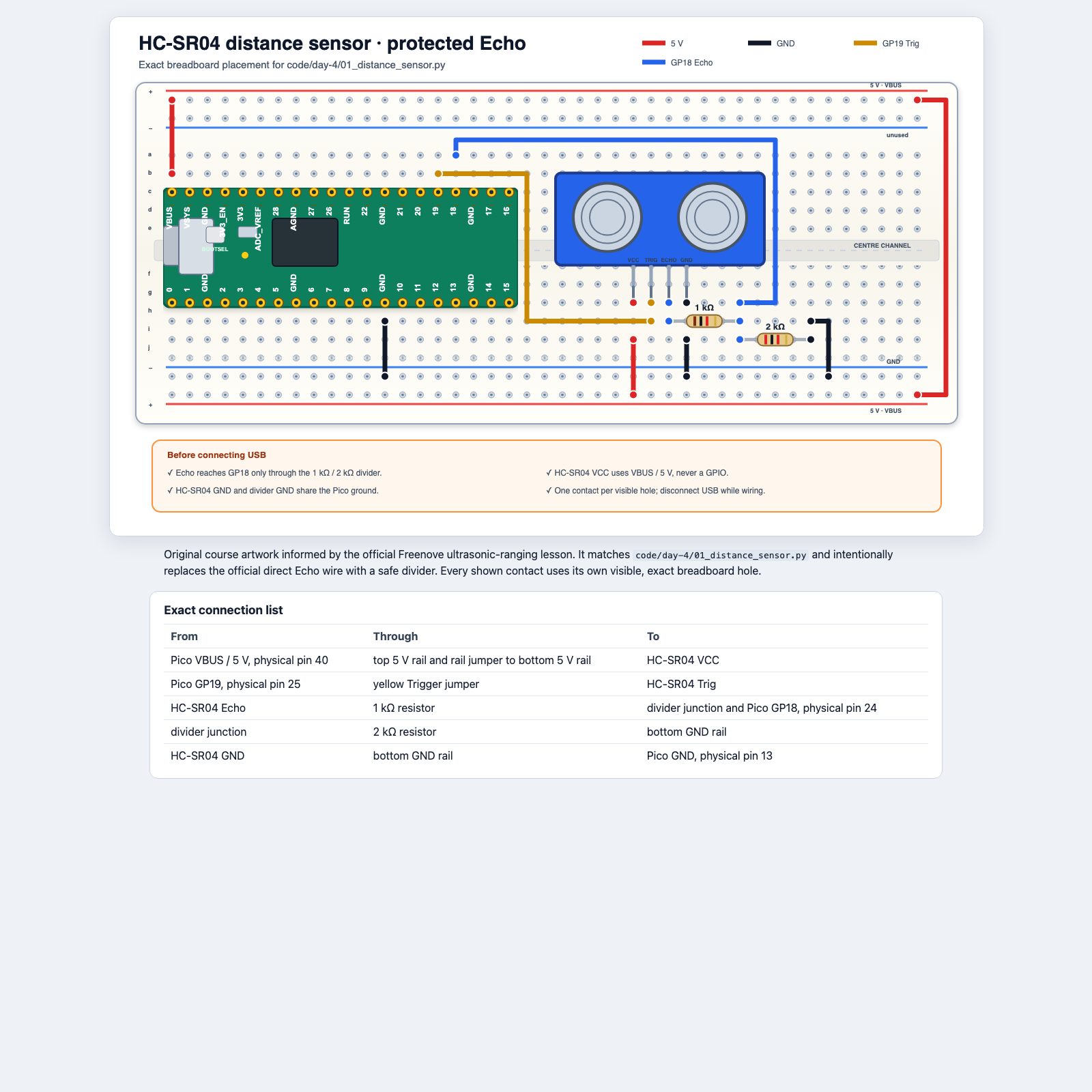
Why two Echo resistors?
Reduce about 5 V to about 3.3 V
Watch and discuss · Keep USB disconnected
up to about 5 V
top resistor
about 3.3 V
Never connect HC-SR04 Echo directly to a Pico GPIO.
How measurement works
The sound makes a round trip
Watch and discuss · Trace the journey
a short pulse
to the object
to the sensor
the pulse
distance_cm = pulse_us * 0.0343 / 2
Divide by 2 because the measured time includes the trip out and the trip back.
Test the sensor · Task 1
Measure before you trust
Test the circuit · Instructor checks, then connect USB
Compare
Take three readings at each position. Record how far each reading is from the ruler distance.
Then try a soft target and an angled target. Describe what changes; do not “fix” the code yet.
Missing data
None means “no usable measurement”
Try in Thonny · Predict both paths
distance = measure_distance_cm()

if distance is None:
    print("No echo")
else:
    print(distance)
Using 0 for failure would falsely mean “the object is touching the sensor.”
Timeouts
Waiting must have a limit
Discuss · What if no echo ever returns?
pulse_us = time_pulse_us(echo, 1, ECHO_TIMEOUT_US)

if pulse_us < 0:
    return None
The timeout lets the program report failure and continue instead of waiting forever.
Build while unplugged · Task 2
Passive buzzer with transistor
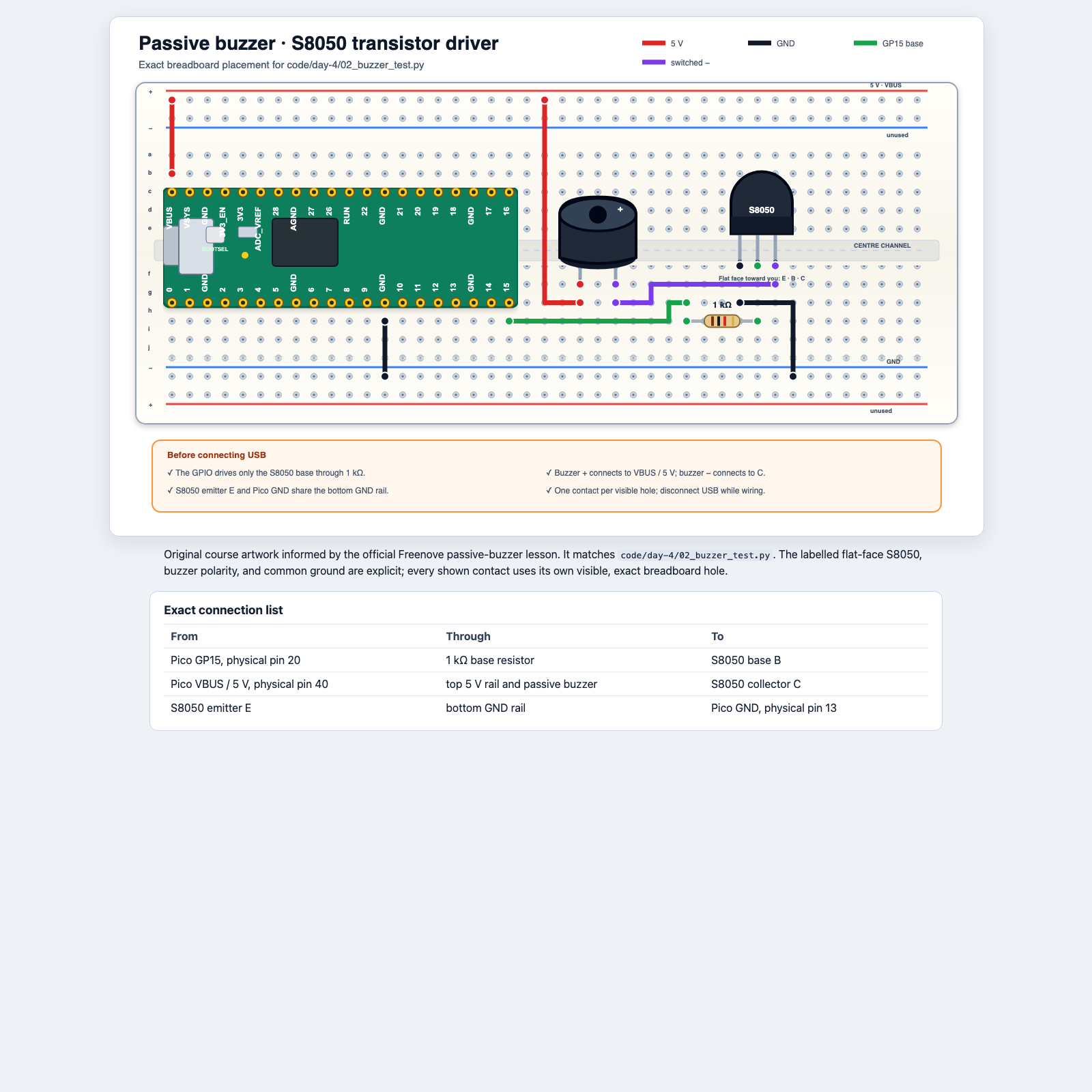
Why a transistor?
GP15 controls; it does not power the buzzer
Watch and discuss · Point to each path on the diagram
Control path
GP15 → 1 kΩ resistor → transistor base B
Power path
VBUS → buzzer → collector C → emitter E → GND
Do not connect the buzzer directly to GP15.
Test the buzzer · Task 2
Start short and quiet
Test the circuit · Partner-check E/B/C, then connect USB
Observe
Three brief tones: 1200 Hz, 1600 Hz, and 2000 Hz.
Keep the buzzer away from ears. Visual-only participation is always acceptable.
Key-value pairs
A dictionary labels each value
Try in Thonny · Use the Shell
zone = {"colour": "amber", "pause_ms": 600}

print(zone["colour"])
print(zone["pause_ms"])
Key
"colour" is the label used to find a value.
Value
"amber" is the setting stored under that key.
Update one setting
Use the same key to replace its value
Try in Thonny · Predict the final dictionary
zone = {"colour": "amber", "pause_ms": 600}
zone["pause_ms"] = 400
print(zone)
The key remains "pause_ms"; its value changes from 600 to 400.
Several alarm states
One state selects one settings dictionary
Watch and discuss · Read from outside to inside
ZONE_CONFIG = {
    "safe": {"beep_ms": 0, "pause_ms": 300},
    "caution": {"beep_ms": 80, "pause_ms": 520},
    "stop": {"beep_ms": 80, "pause_ms": 120},
}

pause = ZONE_CONFIG["caution"]["pause_ms"]
First choose "caution"; then read its "pause_ms" value: 520.
Build while unplugged · Daily task
Sensor and buzzer together
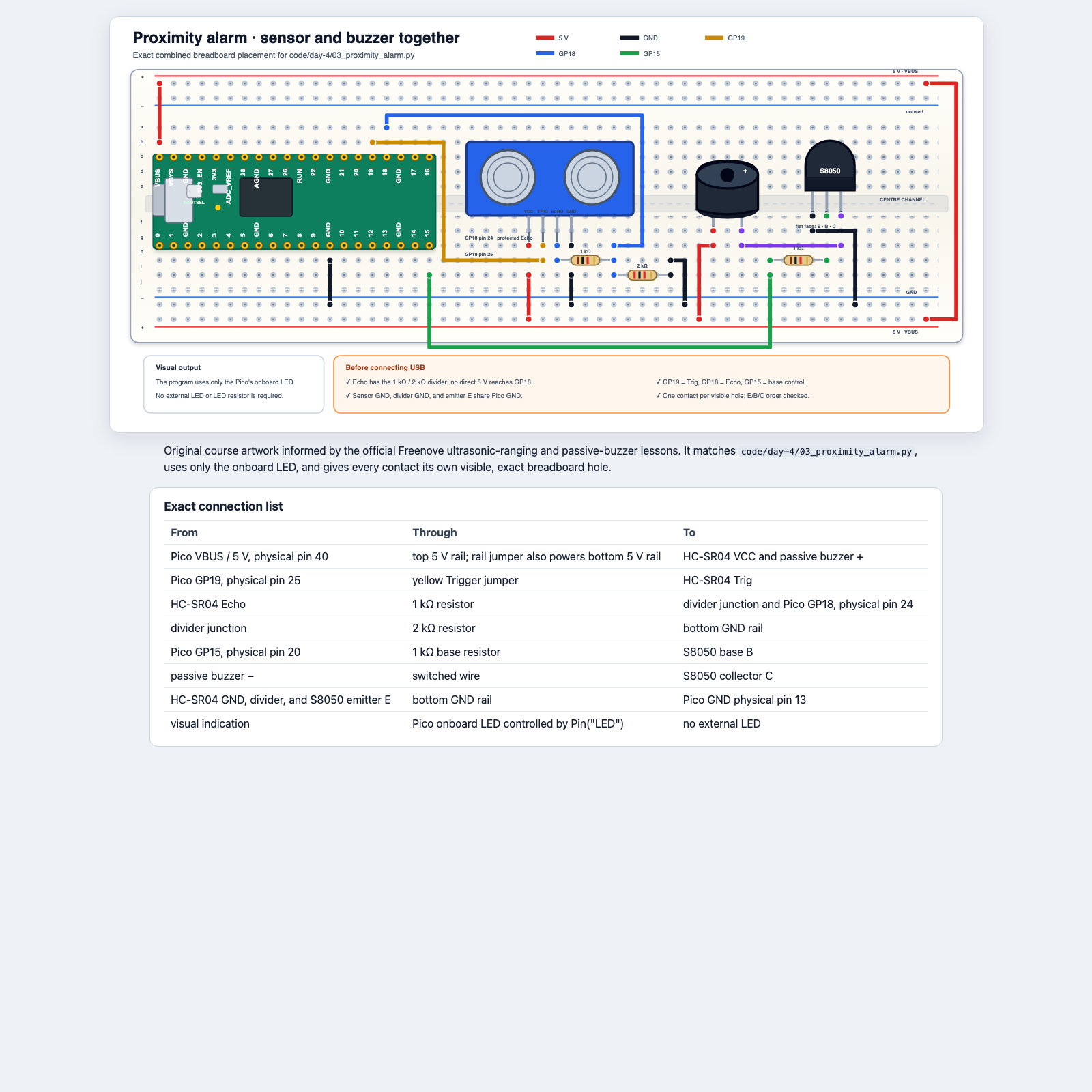
Layered build · Daily task
Retest before combining
Build while unplugged · Instructor checks before USB
- Keep the verified sensor and Echo divider in place.
- Add the buzzer, transistor, and 1 kΩ base resistor from the combined diagram.
- Check 5 V, common GND, divider junction, and transistor
E/B/C. - Reconnect and rerun the distance test.
- Rerun the buzzer test.
- Only then open
03_proximity_alarm.py.
One job per function
Measure → classify → alert
Watch and discuss · Follow one distance through the program
distance = measure_distance_cm()
zone = classify_distance(distance)
alert_once(zone)
Measure
Returns a number or None.
Classify
Returns "safe", "caution", "stop", or "invalid".
Alert
Uses the state to control light and sound.
Write the rules first
Every distance needs one expected state
On paper · Agree before changing code
| State | Distance rule | Light | Sound |
|---|---|---|---|
| safe | over 60 cm | steady | silent |
| caution | over 25 through 60 cm | slow blink | slow beep |
| stop | 25 cm or less | fast blink | fast beep |
| invalid | None | off | silent |
Boundary tests
Test the edges, not only easy examples
On paper · Predict each result
61 cm
safe
60 cm
caution
25 cm
stop
None
invalid
A requirement says what must happen. A test case gives one exact input and expected result.
Daily task
Proximity Alarm Prototype
Check the code
- Trace
Nonethrough all three functions. - Find each threshold comparison.
- Find the dictionary lookup.
Check the behaviour
- Demonstrate safe, caution, and stop.
- Point the sensor away to create invalid.
- Press Stop; confirm light and sound turn off.
Invalid input must never create a continuous alarm.
Exit ticket
Why is a timeout required?
Explain what the program should do when no echo returns, and why returning None is better than returning 0.
Teacher reference
Teaching sequence and sources
TEALS adaptation
Unit 3 return values and None; Unit 6 key-value lookup and update; Unit 8 scenarios, requirements, and specifications.
Workshop adaptation
HC-SR04 timing and timeout, protected Echo input, transistor-driven buzzer, layered integration, and boundary tests.
Sources: TEALS Units 3, 6, and 8 lesson materials. Hardware tasks use the workshop's original course diagrams and linked Freenove attribution.